Scoping a tiCrypt Deployment
Scoping a tiCrypt deployment is the work of placing every host, service, and network of the deployment in one of the five CMMC Level 2 asset categories and drawing the assessment boundary that results. It gives you three things an assessor asks for before an assessment starts: an asset inventory, a network diagram of the CMMC Assessment Scope, and a statement of how the enclave is separated from the rest of your network. Scoping is not a control mapping. The CMMC Level 2 control guide says who implements each practice, and scoping says which systems those practices are assessed on.
Why scoping changed
An older reading of the CUI rules held that storage and networks that handle only ciphertext sit outside an assessment. The Department of Defense CIO has answered that reading in writing. The following table describes the three answers that decide how a tiCrypt deployment is scoped. The source is the CMMC Frequently Asked Questions (July 2026 edition), questions B-Q8, F-Q3 and F-Q4.
| Question | Answer | What it means for a tiCrypt deployment |
|---|---|---|
| B-Q8: Is encrypted CUI still considered to be CUI? | Yes. The FAQ states that "encrypted CUI data retains the control designation given to the plain text counterpart." | Every system that stores or carries tiCrypt ciphertext handles CUI. Storage, replicas, and backups are in scope. |
| F-Q3: Can encryption alone create logical separation for a network within a CMMC Assessment Scope? | "No." Encryption "does not, by itself, prevent data transfer or enforce the security boundary of a network." | The boundary rests on the external firewall, the VLANs, and the filtering on the backend. tiCrypt's encryption does not provide it. |
| F-Q4: Must enterprise networking components that carry an enclave's encrypted CUI be brought into its scope? | "No. So long as the enclave is otherwise logically separated from the greater enterprise network, the transmission of properly encrypted CUI data does not incur an extension of the CMMC Assessment Scope to include the enterprise networking components." | Enterprise switches and routers between your users and the enclave stay out of scope, provided the separation that F-Q3 asks for is in place. |
Together the answers change the question. tiCrypt's encryption still decides who can read file and drive content. It no longer decides which systems are assessed. A scope drawn on the older reading leaves out the storage, the backups, and the ingress hosts, and an assessor then finds assets that have no entry in the inventory and no treatment in the SSP.
The five asset categories
The CMMC Scoping Guide for Level 2 (version 2.13), published on the same Department of Defense CIO page, sorts every asset into one of five categories. The following table describes the categories in the guide's own words. The guide calls your organization the OSA, the Organization Seeking Assessment.
| Category | The guide's description | What your organization does | What the assessor does |
|---|---|---|---|
| CUI Asset | "Assets that process, store, or transmit CUI" | Documents it in the asset inventory, the SSP, and the network diagram. | "Assess against all Level 2 security requirements" |
| Security Protection Asset | "Assets that provide security functions or capabilities to the OSA’s CMMC Assessment Scope" | Documents it in the asset inventory, the SSP, and the network diagram. | "Assess against Level 2 security requirements that are relevant to the capabilities provided" |
| Contractor Risk Managed Asset | "Assets that can, but are not intended to, process, store, or transmit CUI because of security policy, procedures, and practices in place" | Documents it in the asset inventory, the SSP, and the network diagram. | Reviews the SSP, and can run a limited check if the documentation raises questions. |
| Specialized Asset | "Assets that can process, store, or transmit CUI but are unable to be fully secured" | Documents it the same way, and shows that it is managed under your risk-based security policies. | Reviews the SSP. No tiCrypt component is a Specialized Asset. |
| Out-of-Scope Asset | "Assets that cannot process, store, or transmit CUI; and do not provide security protections for CUI Assets" | "Prepare to justify the inability of an Out-of-Scope Asset to store, process, or transmit CUI" | Nothing. |
Two sentences in the guide matter for the tables that follow:
- Memory counts as storage: The guide defines stored CUI as CUI "at rest on an asset (e.g., located on electronic media, in system component memory, or in physical format such as paper documents)". A host that runs a VM holds what is in that VM's memory.
- In scope wins: "An asset that falls into any in-scope asset category cannot be considered an Out-of-Scope Asset." A host with several roles is in scope if any one of them is.
Assets and their categories
The following tables describe every component of a deployment: what it holds or does with CUI, the category to plan for and the reason, and what your organization documents or does. The names in bold are the labels in the network diagram.
The second column uses five words:
- Plaintext: CUI that the asset can read.
- Ciphertext: CUI encrypted with a key the asset does not hold.
- Metadata: What tiCrypt stores unencrypted about files and drives, such as file and directory names.
- Security data: What the scoping guide calls security protection data, "security-relevant information which, if disclosed, could aid an attacker in the compromise of the system". Logs, configuration, and credentials are examples.
- Nothing: No CUI and no security data of the deployment.
A row marked Depends names what decides the category. tiCrypt cannot settle those rows for you. A small deployment can run several of these roles on one host. That host takes every category that applies to it, so plan for the widest one.
Assets outside the enclave that are in scope
| Asset | What it holds or does with CUI | Category to plan for, and why | What your organization documents or does |
|---|---|---|---|
| User endpoints | Plaintext, in the default configuration. tiCrypt Connect or the browser encrypts and decrypts Vault files on the endpoint, and the user's private key file is stored there. | Depends on what the endpoint can exchange with the deployment. It is a CUI Asset while a user can upload, download, or view Vault files on it, because it then processes CUI. FAQ questions F-Q1 and F-Q2 allow an Out-of-Scope Asset only for an endpoint that exchanges keyboard, video, and mouse data and nothing else. See Endpoints and FAQ questions F-Q1 and F-Q2. | Lists the endpoints, or the managed endpoint build, in the asset inventory. To argue an endpoint out of scope, closes every path in the endpoint section and shows the configuration to the assessor. |
| Administrator workstations | Security data: the credentials and SSH keys that administer the hosts on port 22. | Depends on your administration path. A workstation that can change the configuration of in-scope hosts is normally scoped with them. The scoping guide lists enterprise network administrators among its examples of Security Protection Assets. | Limits port 22 at the external firewall to these workstations or to a jump host, and lists whichever one it uses in the inventory. |
| MFA provider and identity provider | Security data: the second authentication factor and the key that signs the MFA certificate. It receives no CUI. The user's browser carries the signed certificate to the backend, and the provider never connects to the backend. | Security Protection Asset. It provides authentication to the assessment scope. If an outside provider runs it, that provider holds security data of yours and is an external service provider. | Lists it in the inventory and the diagram. For a hosted service, records the provider and its responsibility matrix in the SSP. |
| SIEM | Security data: the alerts that tiCrypt Audit sends to systems such as Splunk or Sumo Logic, and whatever the monitoring proxy sends on. Audit records include file and directory names, so the SIEM holds CUI only if those names contain it. | Security Protection Asset. The scoping guide gives a SIEM as its example of one, and calls the logs it holds security protection data. Depends on who runs it. Your own SIEM is your asset. Only a SIEM run by an outside provider makes that provider an external service provider, and for a cloud service FAQ question E-Q1 then asks whether CUI reaches it. | Keeps CUI out of file and directory names. Lists the SIEM and the place its older logs are kept. For an outside provider, follows External service providers below. |
Assets outside the assessment scope
| Asset | What it holds or does with CUI | Category to plan for, and why | What your organization documents or does |
|---|---|---|---|
| Enterprise network equipment | Nothing it can read. It carries TLS and SSH sessions between endpoints, senders, and the enclave. tiCrypt sends no CUI across it unencrypted. | Out-of-Scope Asset, on one condition. FAQ question F-Q4 keeps these components out of scope only while "the enclave is otherwise logically separated from the greater enterprise network". The equipment that enforces the separation is in scope: see External firewall and Switches and VLANs. | Has nothing to document for an Out-of-Scope Asset. Prepares to show why the equipment cannot reach CUI: the firewall rules and the VLAN configuration. |
| External senders | Their own copy of what they send. A sender has no tiCrypt account and can read nothing in the deployment. | Outside the assessment scope. A sender's computer is not an asset in your environment. What the sender delivers arrives at an ingress host, which is. | Shows the inbound flow in the diagram, and decides who may issue inbox links. |
| Licensing servers and package mirrors | Nothing, by design. A secure VM reaches one only on the address and ports that an allow list names. The path carries license checks and package downloads. | Depends on the server. One that cannot receive CUI and provides no security function fits the Out-of-Scope description. An allowed port that accepts uploads is a way out of a secure VM, and the assessor weighs it as one. | Records every entry of the Global Licensing Servers list and every VM access rule in the SSP, with the server, the ports, and the reason. A package mirror offered to VMs as a read-only share belongs inside the boundary, with the storage. |
| Tera Insights | Nothing. Tera Insights staff have no access to a deployment. Software arrives as signed packages that your administrators install. | Outside the assessment scope, unless you send it logs or configuration files or engage it to administer the deployment. Either choice makes it an external service provider. | States the relationship in the SSP. Tera Insights as a Service Provider has the wording. |
Hosts outside the external firewall
These hosts are inside the assessment boundary. Their place outside the external firewall is a network decision, not a scoping one.
| Asset | What it holds or does with CUI | Category to plan for, and why | What your organization documents or does |
|---|---|---|---|
| SFTP ingress host | Plaintext, in memory. A sender's files arrive over SFTP on port 2020. ticrypt-sftp encrypts them for the inbox owner in 8 MiB chunks and passes ciphertext to the REST frontend. | CUI Asset when senders deliver CUI. It processes CUI before it encrypts it. | Lists it in the inventory and the diagram, and hardens it as an internet-facing host with a TLS certificate of its own. |
| Mailbox ingress host | Ciphertext. It serves the inbox upload page, which encrypts each file in the sender's browser. The submitted files it passes to the REST frontend are already encrypted. | CUI Asset when senders deliver CUI. It transmits encrypted CUI, which is still CUI under FAQ question B-Q8, and it serves the code that performs the encryption. | Lists it, keeps the inbox upload page at a current signed version, and gives the host a TLS certificate of its own. |
| Audit server | Security data: every audit record the backend pushes to tiCrypt Audit on port 25000, stored in ClickHouse. tiCrypt Audit turns the records into alerts, reports, and ad hoc queries, and never deletes them. The records include file and directory names. | Security Protection Asset. It holds the audit trail of the scope and raises its alerts. It also holds CUI if file or directory names contain it. | Lists it, keeps CUI out of file and directory names, and sizes its storage for a record that only grows. |
Backend
The backend is ten services that can share one host or be spread across several. The host is the asset. The service rows say what each group of services contributes to its host's category.
| Asset | What it holds or does with CUI | Category to plan for, and why | What your organization documents or does |
|---|---|---|---|
| Backend host(s) | Ciphertext, metadata, and security data. Every Vault upload and download and every VM session passes through it encrypted. It holds no key that decrypts file or drive content. | CUI Asset. It transmits encrypted CUI, which is still CUI under FAQ question B-Q8, and it is the main security function of the scope. | Lists each backend host. If you split the services across hosts, gives each host the category of the services it runs. |
| REST frontend | Ciphertext and metadata. ticrypt-rest receives and serves Vault chunks that the client has already encrypted, reads and writes the Vault chunk directory, and handles file and directory names. | Makes its host a CUI Asset: it stores and transmits encrypted CUI. | Documents port 443 as the single HTTPS entry point, with its external and internal listeners. |
| Proxy | Ciphertext. ticrypt-proxy relays VM sessions between a user and a VM on the tunnel ports, 6000-6100 in the standard installation. The sessions are encrypted end to end, and the proxy cannot read them. | Makes its host a CUI Asset: it transmits encrypted CUI. | Documents the tunnel port range, and binds the proxy to the proxy domain only. |
| Authentication | Security data: user public keys, sessions, the checks on MFA certificates, and the escrowed copies of private keys, which are encrypted. | A security function. Its host is at least a Security Protection Asset. | Documents the MFA factors and the escrow groups. |
| File, VM and batch services | Metadata: which chunks belong to which file, who holds a wrapped key, VM and drive records, and Slurm resource requests. No file or drive content. | A security function, the enforcement of access. Its host is at least a Security Protection Asset. | Nothing beyond the host. |
| Logging | Security data. ticrypt-logger writes the audit record to a local file and streams a copy to the audit server on port 25000. | A security function. Its host is at least a Security Protection Asset. | Documents where the local log file is kept and how it is backed up. |
| Support services | Metadata: usage statistics, notifications, and scheduled maintenance. | No CUI. The services run on an in-scope host and share its category. | Nothing beyond the host. |
| VM gateway and firewall | Security data: DHCP and DNS for the three VM networks, and the firewall rules that deny VM egress by default and open the allow lists. All VM traffic passes through it. From backend 3.16.0, ticrypt-nft writes the rules. | A security function, and the one the separation statement rests on: the backend is the only host that forwards or filters VM traffic. | Names it in the logical-separation statement, and records the allow lists. |
| Platform database | Metadata and security data: file and directory names, which are not encrypted, access control records, and the per-file keys, each wrapped with a user's RSA-2048 public key. No file or drive content. | Security Protection Asset at the least: it holds the wrapped keys and the access control records. It holds no CUI content, and it becomes a store of CUI if file or directory names contain CUI. Every host that runs a MongoDB replica is in scope either way. | Keeps CUI out of file and directory names. Protects the database and its backups with your own controls, because tiCrypt does not encrypt them. |
Networks, VM hosts, and VMs
| Asset | What it holds or does with CUI | Category to plan for, and why | What your organization documents or does |
|---|---|---|---|
| External firewall | Security data: its rule set. It passes ciphertext and management traffic. | Security Protection Asset. It enforces the boundary, which FAQ question F-Q3 says encryption cannot do. | Documents the rules: inbound 443, the proxy's tunnel ports, and 22, and port 2020 on the SFTP ingress host. If you run no separate firewall, the installer configures firewalld on the backend, and the backend host is the firewall. |
| Switches and VLANs | Security data: the VLAN configuration. They carry the three VM networks (secure, service, and data-in) and the management network. CUI on the secure VM network travels encrypted, with the one exception under Slurm or HPC nodes. | Security Protection Asset at the least, because the VLANs provide the separation. They also carry CUI, so expect the assessor to ask whether they are CUI Assets. They are in scope either way. | Documents that the three VLANs are not forwarded outside the switches that connect the tiCrypt hosts, and that nothing routes between them. |
| VM hosts (hypervisors) | Plaintext, in the memory of the secure VMs they run. The drives they attach are ciphertext, and the host has no drive key. | CUI Asset. CUI in a running VM is in the host's memory. | Lists every host. Limits each one to the management network and the VLAN trunk: a VM host needs no external interface. |
| Secure VMs | Plaintext. Users work on CUI here. Drives are encrypted inside the VM with LUKS or BitLocker. Outbound traffic is denied unless an allow list opens it, and only port 22 accepts connections. Secure VMs share one VLAN. Each VM blocks every inbound port except 22, where its controller accepts only authenticated tunnels. | CUI Asset. This is where CUI is processed. | Documents the VM images as the baseline: FIPS mode, clipboard and drive redirection turned off, and anti-virus. Anti-virus is part of the image: ClamAV on Linux when clamAVEnabled = true in the controller configuration, or a product such as Microsoft Defender on Windows. |
| Service VMs | Nothing. A service VM has an image and no drives, and its network has no route to the secure VM network. Administrators use it to prepare VM images. | Part of its VM host, for planning. It cannot reach CUI, but it runs on an in-scope host and produces the images that secure VMs boot from. The assessor decides whether it needs a category of its own. | Documents it with the VM hosts and with the procedure that builds images. |
| Data-in VMs | The data it fetches, in plaintext while it fetches it. A data-in VM starts with a newly formatted drive and general outbound access, and the drive is then attached to a secure VM. | Depends on what you fetch. It is a CUI Asset if CUI arrives this way. If your policy limits data-in VMs to data that is not CUI, it fits the description of a Contractor Risk Managed Asset. | States in the SSP which data may arrive through data-in VMs, and requires an encrypted protocol for the transfer. |
| Slurm or HPC nodes | Plaintext, in the memory of the secure VMs that run batch jobs. Traffic between the VMs of one job crosses the secure VM network unencrypted unless the image sets vpn = true. Global Slurm sees CPUs, memory, and time, and no job content. | CUI Asset if you run batch jobs, for the same reason as a VM host. The nodes use the same networks and storage pools as the VM hosts. | Lists the nodes. Sets vpn = true in the batch section of the image configuration, or documents that the secure VM network carries plaintext between job VMs and scopes its switches to match. |
Monitoring
tiCrypt Audit records user activity as the backend sees it. Host and VM monitoring is yours to add, and tools such as SentinelOne or CrowdStrike run both on the host servers and inside VMs. The scoping guide states that "Security Protection Assets provide security functions or capabilities within the OSA’s CMMC Assessment Scope", and it counts "log files generated by or ingested by a security protection asset" as security protection data. A monitoring tool is both.
| Asset | What it holds or does with CUI | Category to plan for, and why | What your organization documents or does |
|---|---|---|---|
| Monitoring agents | Security data: the logs and events they collect on the host servers and inside VMs. An agent inside a VM is part of the VM image. | Security Protection Asset, as part of the monitoring tool. It provides a security function to the scope. The host or VM image it runs on keeps its own category. | Lists the tool, and the images that carry it. Confirms what the agent collects inside secure VMs: logs and events are security data, and file content is CUI. |
| Monitoring proxy | Security data: the logs and events that the agents push to it. The proxy, or collector, is a server inside the enclave, so no VM needs a path out of the enclave to report. | Security Protection Asset. It provides a security function to the scope, and it holds security protection data. | Lists it and shows it in the diagram. A super-admin opens the path from secure VMs to the proxy with a VM access rule, limited to the VM configurations that need it. Older deployments use an allow-list entry, which opens the proxy to every VM. What the proxy forwards onward is your choice: see SIEM. |
Storage and backup
| Asset | What it holds or does with CUI | Category to plan for, and why | What your organization documents or does |
|---|---|---|---|
| Vault chunk storage | Ciphertext. Vault files are stored as 8 MB chunks, each encrypted with the file's AES-256 key before it reaches the server. Only the backend reads and writes the directory. | CUI Asset. It stores encrypted CUI, which is still CUI under FAQ question B-Q8. | Lists the storage system. On shared storage, gives tiCrypt an export of its own, restricted to the backend. See Carving Out a CUI Enclave on Your Existing Filesystem. |
| Drive and image storage pools | Ciphertext for drives. Each drive is encrypted inside its VM, and the pool holds the image file. The VM boot images in the pools are not encrypted and hold no user data. | CUI Asset. The drive pool stores encrypted CUI. | Lists the storage system, restricts the pool exports to the VM hosts, and keeps CUI out of VM boot images. |
| Backup and replication targets | Ciphertext copies of the Vault chunks and the drive images, and a copy of the platform database, which holds unencrypted file and directory names and the wrapped keys. | CUI Asset. A copy of encrypted CUI is CUI. A cloud service that holds one must meet the FedRAMP Moderate baseline or its equivalent (FAQ question E-Q2). | Records the backup location in the SSP, keeps it inside the boundary, and protects the database backup with your own encryption. |
Endpoints and FAQ questions F-Q1 and F-Q2
FAQ question F-Q1 treats an endpoint that reaches a virtual desktop as an Out-of-Scope Asset "if it is configured to not allow any processing, storage, or transmission of CUI beyond the Keyboard/Video/Mouse sent to the VDI client", and adds that "Proper configuration of the VDI client must be verified." Question F-Q2 lists what that configuration takes.
tiCrypt Connect is not a virtual desktop client. In the default configuration it also encrypts and decrypts Vault files on the endpoint. The following table describes each condition of F-Q2 and the tiCrypt setting that bears on it.
| Condition in F-Q2 | What tiCrypt does by default | What to change or show |
|---|---|---|
| "The virtual desktop server must be configured to block copy-paste, file transfers, or any other data exchange across the session." | Copying out of the app is off: the Copy to clipboard setting defaults to Nobody. The image guides turn off clipboard and drive redirection in remote desktop sessions. File transfer through the Vault is on: users can upload and download. | Remove the Download the content of files they can access and Upload file content (needed to upload) permissions from the users concerned. Leave sftpEnabled at false in the VM images. Register no external SFTP server for those users. |
| "The VDI should only transmit video, keyboard, and mouse data." | A VM session forwards the TCP ports named in allowedPorts in the image's controller configuration. | Limit allowedPorts to the remote desktop port. |
| "Users must log into the virtual desktop and handle CUI entirely within the session." | The Vault viewer and Vault downloads decrypt files on the endpoint. | Without the download permission, a user cannot view or download Vault files on the endpoint. Confirm with a test account that the work those users do in VMs still succeeds. |
| "Multifactor authentication to the VDI server must be separate from the unmanaged client, such as using a hardware-based one-time password token or Public Key Infrastructure token with a password/Personal Identification Number." | The first factor is the user's private key, held in a key file on the endpoint. The second factor comes from your MFA provider. | Choose a second factor that does not live on the endpoint, and ask your assessor whether the key file on the endpoint meets this condition. |
| "Only authorized users should be allowed to access the virtual desktop environment, and access should be restricted to allowable locations." | An administrator approves each account and signs its public key. | Where your policy sets allowable locations, restrict source addresses at the external firewall. |
In the default configuration, plan for CUI Asset. The Out-of-Scope treatment is open only to a deployment that closes every path above for the users concerned, and whether it has done so is the assessor's decision. The settings are described in Permissions, System Settings and Controller Configuration.
Network diagram
The diagram draws the assessment scope of a production deployment from the outside in: what reaches the deployment, the enterprise network it crosses, the hosts outside the external firewall, and the enclave behind it. Every name in it is the name of a row in the tables above.
The standard production layout, with the ingress services and tiCrypt Audit on hosts of their own.
Download the diagram (SVG)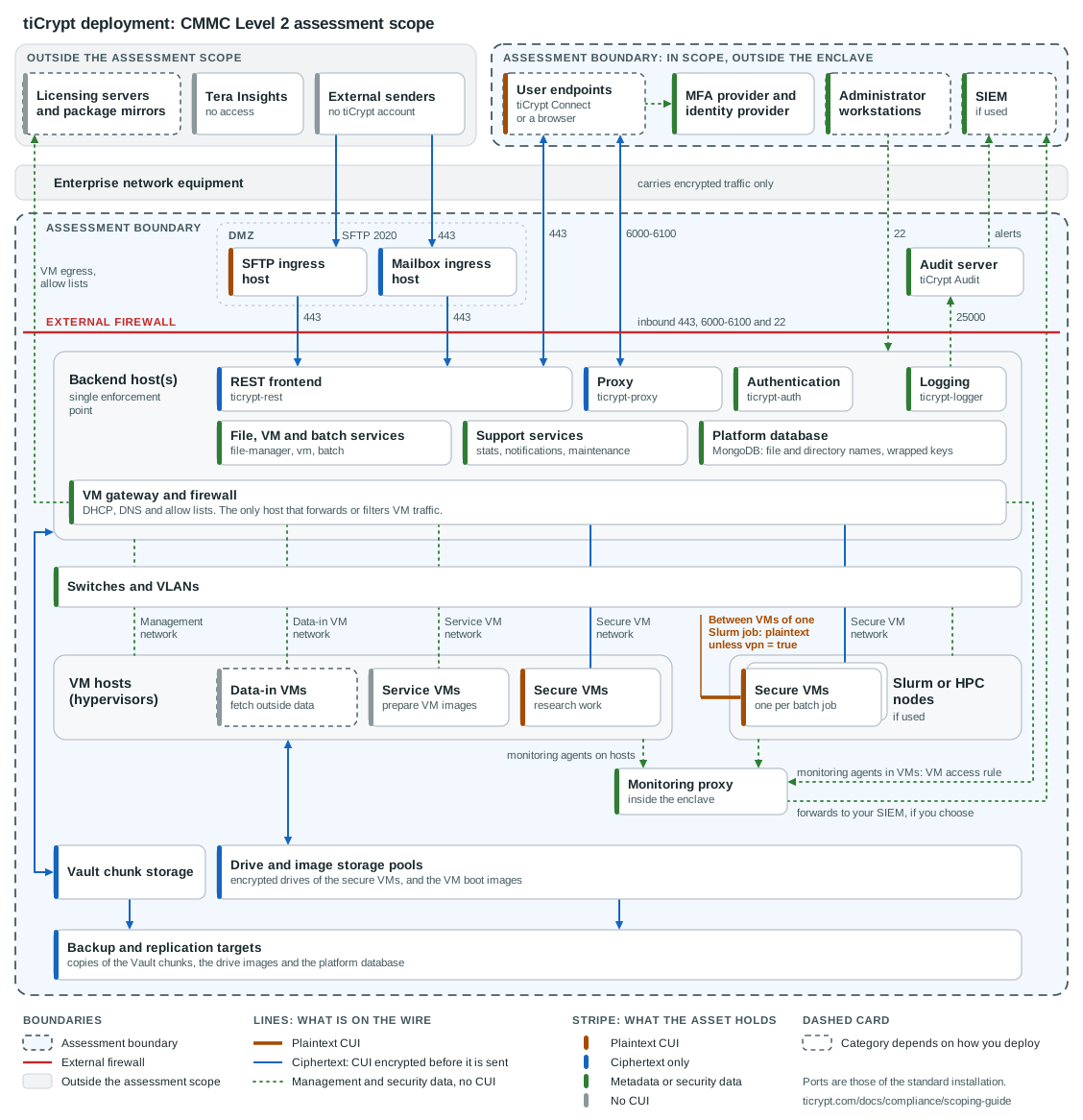
The same drawing is available as a file: ticrypt-scope-diagram.svg. It has a white background, uses no external fonts or images, and opens in any vector editor.
How to read it
- Two assessment boundaries: The dashed outlines hold everything in scope. The upper one holds the assets outside the enclave, and the lower one holds the enclave. Enterprise network equipment lies between them and stays out of scope under FAQ question F-Q4.
- One enforcement point: VM hosts forward nothing, and the three VM networks meet only at the VM gateway and firewall. Every line that crosses the external firewall starts or ends at the backend, except what the monitoring proxy forwards to your SIEM.
- Lines show what is on the wire: Every line that carries CUI is ciphertext, with one exception: traffic between the secure VMs of one Slurm job when the image does not set
vpn = true. - Stripes show what an asset holds: A session that is ciphertext on the wire still delivers plaintext to both of its ends, so the user endpoints and the secure VMs carry the plaintext stripe.
- Dashed cards depend on you: Their category changes with how you deploy, and the tables say what decides it. The drawing shows each one in its default state: user endpoints with plaintext, data-in VMs without CUI.
Adapt it before you use it
The drawing is a starting point, not your diagram. Change it in five ways before it goes into your SSP:
- Remove what you do not run: Delete the Slurm nodes, the data-in VMs, an ingress host, or the monitoring proxy if your deployment has none.
- Merge shared hosts: Where one machine serves several roles, draw one host and give it the widest category among them.
- Place storage and backup: Move the storage and the backup target to where they sit in your network, and keep them inside a dashed outline.
- Add your identifiers: Add your host names, addresses, and VLAN IDs.
- Settle the dashed cards: Redraw each dashed card with the category you decided on.
What to write in your SSP
- Asset inventory entries: Add one entry for each row above that you run, with its category and the reason. The scoping guide requires the inventory for every in-scope category and states that "there is no requirement to embed each asset in the System Security Plan (SSP)".
- Asset treatment: State how the assets of each category are handled. The guide asks you to "document the treatment of these assets in the SSP".
- Network diagram: Include the adapted diagram. The guide asks for "a network diagram of the CMMC Assessment Scope" to support the scoping discussion before the assessment.
- Logical-separation statement: State what separates the enclave from the enterprise network, and name each control from the table below. Do not rest the statement on encryption.
- Backup location: Name every system that holds a copy of the Vault chunks, the drive pools, or the platform database. A system that holds Vault chunks or drive pools is a CUI Asset, and for a cloud target you record its FedRAMP Moderate authorization or its equivalency. A system that holds only the platform database takes the database's category: a Security Protection Asset, and a CUI Asset as well if your file or directory names can contain CUI.
- External service providers: List every outside party that holds your CUI or your security data. The guide's test is that "data (specifically CUI or Security Protection Data, e.g., log data, configuration data) must reside on the ESP assets". A hosted MFA provider, a SIEM or monitoring service run by a provider, and a cloud backup target can each meet it. A provider that receives no CUI is assessed as part of your scope and needs no certification of its own (FAQ question E-Q4). A cloud service that stores, processes, or transmits CUI must meet the FedRAMP Moderate baseline or its equivalent (FAQ question E-Q1).
- Decisions on the rows that depend on you: Record the endpoint restrictions, the rule that keeps CUI out of file and directory names, the data allowed through data-in VMs, the
vpnsetting of Slurm images, and what the monitoring proxy forwards. - Boundary changes: Update the inventory and the diagram when you add a host, a storage system, or a backup target. FAQ question F-Q5 describes how to handle a change that affects the scope.
The following table describes the controls that provide the logical separation.
| Control | What it does | Who operates it |
|---|---|---|
| External firewall | Denies inbound traffic by default. Admits port 443, the proxy's tunnel ports (6000-6100 in the standard installation), and port 22 to the backend, and port 2020 to the SFTP ingress host. | Your organization, or the firewalld configuration the installer writes on the backend. |
| Dedicated VLANs | Carry the secure, service, and data-in VM networks. The VLANs are not forwarded outside the switches that connect the tiCrypt hosts, and nothing routes between them. | Your organization, on the switches. |
| Backend as the only gateway | VM hosts have no external interface and no route off site. Only the backend forwards, filters, or translates VM traffic. | tiCrypt, as installed. |
| Default-deny VM egress | A secure VM reaches an outside server only through the Global Licensing Servers list or a VM access rule. From backend 3.16.0, ticrypt-nft enforces both. | tiCrypt enforces it. A super-admin writes the entries. |
| Storage export restrictions | The Vault export is limited to the backend, and the pool exports to the VM hosts. | Your organization, on the storage system. |
Adapt the following statement to your deployment and replace the bracketed text.
The [system name] enclave is logically separated from the [organization] enterprise network. An external firewall denies inbound traffic by default and admits ports 443, 6000-6100 and 22 to the tiCrypt backend, and port 2020 to the SFTP ingress host. VM traffic is carried on three dedicated VLANs that are not forwarded outside the enclave switches and are not routed to one another. The tiCrypt backend is the only host that forwards or filters VM traffic, and it denies outbound traffic from secure VMs except to the destinations listed in [reference]. Storage exports are restricted to the tiCrypt hosts. Traffic that crosses the enterprise network is encrypted before it leaves the enclave, and the separation does not depend on that encryption.